Managing Multiline Messagesedit
You can specify multiline settings in the filebeat.yml file to control how Filebeat deals with messages that
span multiple lines. At a minimum, you need to configure:
-
the
patternoption, which specifies a regular expression. Depending on how you configure other multiline options, lines that match the specified regular expression are considered either continuations of a previous line or the start of a new multiline event. You can set thenegateoption to negate the pattern. -
the
matchoption, which specifies how Filebeat combines matching lines into an event. You can specifybeforeorafter.
See the full documentation for multiline to learn more about these options. Also read YAML Tips and Gotchas and Regular Expression Support to avoid common mistakes.
Testing Your Regexp Pattern for Multilineedit
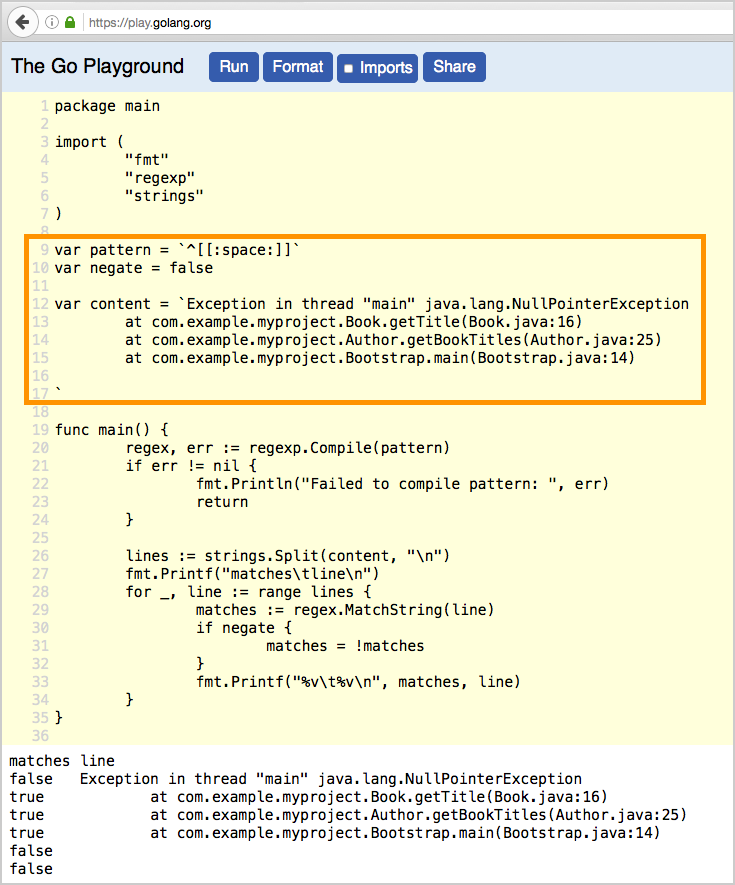
To make it easier for you to test the regexp patterns in your multiline config, we’ve created a
Go Playground. You can simply plug in the regexp pattern along with
the negate setting that you plan to use, and paste a sample message between the content backticks (` `).
Then click Run, and you’ll see which lines in the message match your specified configuration. For example:
Examples of Multiline Configurationedit
The examples in this section cover the following use cases:
- Combining a Java stack trace into a single event
- Combining C-style line continuations into a single event
- Combining multiple lines from time-stamped events
Java Stack Tracesedit
Java stack traces consist of multiple lines, with each line after the initial line beginning with whitespace, as in this example:
Exception in thread "main" java.lang.NullPointerException
        at com.example.myproject.Book.getTitle(Book.java:16)
        at com.example.myproject.Author.getBookTitles(Author.java:25)
        at com.example.myproject.Bootstrap.main(Bootstrap.java:14)
To consolidate these lines into a single event in Filebeat, use the following multiline configuration:
multiline.pattern: '^[[:space:]]'
multiline.negate: false
multiline.match: after
This configuration merges any line that begins with whitespace up to the previous line.
Here’s a Java stack trace that presents a slightly more complex example:
Exception in thread "main" java.lang.IllegalStateException: A book has a null property
       at com.example.myproject.Author.getBookIds(Author.java:38)
       at com.example.myproject.Bootstrap.main(Bootstrap.java:14)
Caused by: java.lang.NullPointerException
       at com.example.myproject.Book.getId(Book.java:22)
       at com.example.myproject.Author.getBookIds(Author.java:35)
       ... 1 more
To consolidate these lines into a single event in Filebeat, use the following multiline configuration:
multiline.pattern: '^[[:space:]]+|^Caused by:'
multiline.negate: false
multiline.match: after
In this example, the pattern matches the following lines:
-
a line that begins with spaces followed by the word
ator... -
a line that begins with the words
Caused by:
Line Continuationsedit
Several programming languages use the backslash (\) character at the end of a line to denote that the line continues,
as in this example:
printf ("%10.10ld  \t %10.10ld \t %s\
  %f", w, x, y, z );
To consolidate these lines into a single event in Filebeat, use the following multiline configuration:
multiline.pattern: '\\$'
multiline.negate: false
multiline.match: before
This configuration merges any line that ends with the \ character with the line that follows.
Timestampsedit
Activity logs from services such as Elasticsearch typically begin with a timestamp, followed by information on the specific activity, as in this example:
[2015-08-24 11:49:14,389][INFO ][env                      ] [Letha] using [1] data paths, mounts [[/
(/dev/disk1)]], net usable_space [34.5gb], net total_space [118.9gb], types [hfs]
To consolidate these lines into a single event in Filebeat, use the following multiline configuration:
multiline.pattern: '^\[[0-9]{4}-[0-9]{2}-[0-9]{2}'
multiline.negate: true
multiline.match: after
This configuration uses the negate: true and match: after settings to specify that any line that does not match the
specified pattern belongs to the previous line.